Bulk QR code generator with a text label under each code
Paste a list or drop a CSV, and get one QR code per row with your own text printed under each code, as a printable PDF sheet or a ZIP of PNG and SVG files, free, with no sign-up, made in your browser.
Your list
Text and look
Check and download
The first six codes show here once the list has a row.
Your list stays in this browser tab. Nothing you paste or drop is uploaded.
What a sheet looks like
This sheet was made by this bulk QR code generator from the 12-row sample CSV: US Letter, four codes per row, each code with its label printed under it. Nothing was edited afterwards.
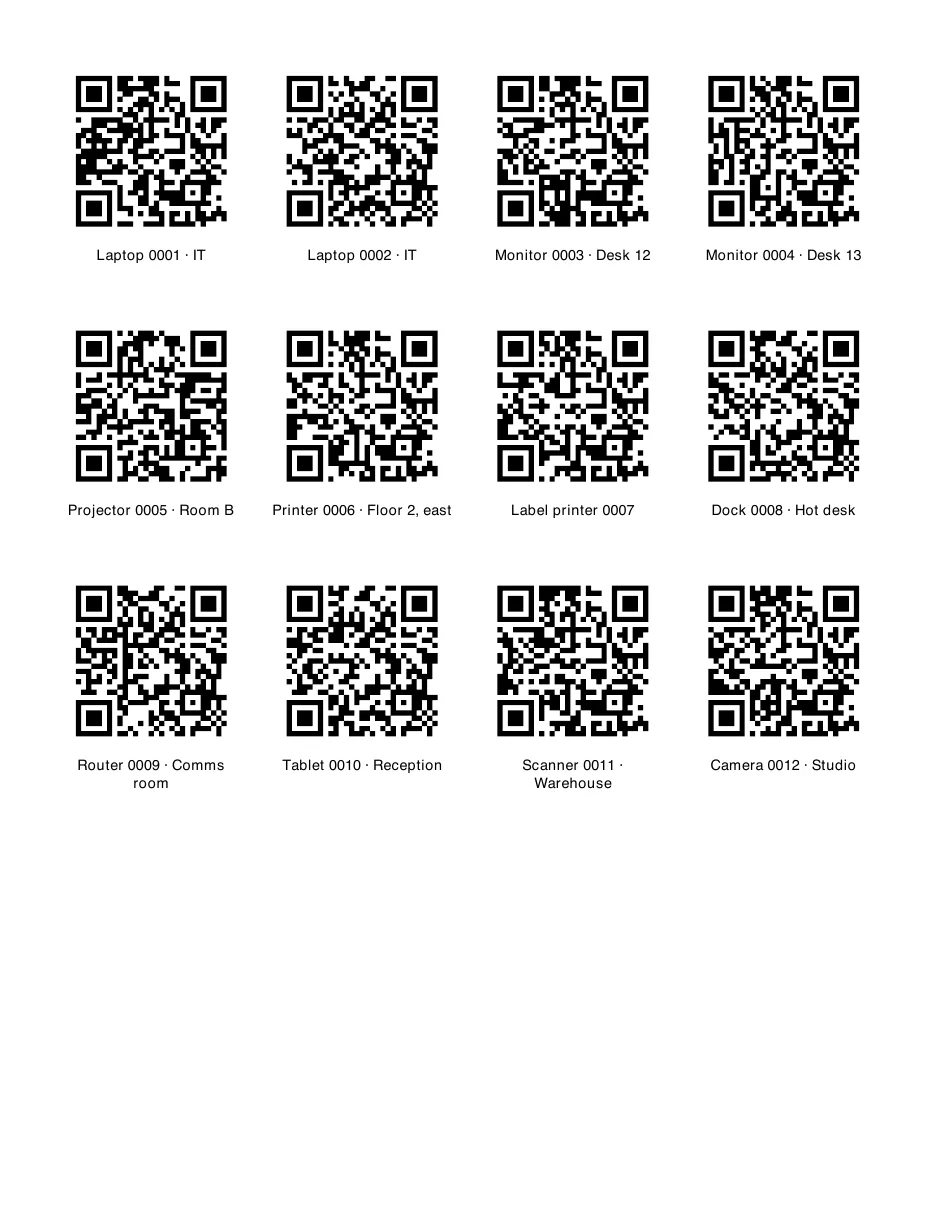
How to generate multiple QR codes at once
1. Bring your list
Paste one item per line, or copy two columns from Excel or Google Sheets and paste them: the first column becomes the code, the second becomes the text under it. You can also drop a CSV file and choose which column is the content and which is the label. For numbered tags, the sequence tab writes SKU-0001 to SKU-0500 for you.
2. Choose the text and the look
The text under each code can be your label column, the code’s own content, or nothing. Set the text size, the error correction level (L, M, Q or H), the quiet zone and the colors. The first six codes are previewed as you change things.
3. Download the sheet or the files
Get a printable PDF sheet on US Letter or A4 with two to six codes per row, or a ZIP with one PNG or SVG file per row. Whether you call it a bulk or a batch QR code generator, the whole batch is made on your device, so there is no queue and no waiting for an email.
What this batch QR code generator does
A label under every code
A hundred QR codes look the same. The label, printed below the code and outside its quiet zone, tells you which is which: an asset number, a table name, a person, a shelf. It is in the PDF, the PNG and the SVG. Text that does not fit on one line wraps to a second; text longer than two lines is shortened with “…” and the tool lists those rows before you download.
Printable PDF sheets
US Letter or A4, with a half-inch margin all round. Four per row gives 16 codes a page, each about 1.75 in (44 mm) wide; six per row gives 36 a page on Letter and 42 on A4, each about 1.1 in (28 mm) wide. Codes are drawn as vector shapes, so they stay sharp at any printer resolution.
ZIP of PNG and SVG files
One file per row, named after the label, or after the row number when there is no label. Duplicate names get -2, -3. PNG width is 256, 512, 1024 or 2048 pixels; SVG keeps the label as real text. The ZIP includes an index.csv that lists every file with its content and label.
CSV, pasted columns or a number sequence
CSV files may use commas, semicolons or tabs, with or without a header row, and quoted cells with commas inside are read correctly. Blank rows are skipped. Excel files (.xlsx) are not read: copy the columns and paste them, or save the sheet as CSV.
Nothing is uploaded
The codes are made by JavaScript in your browser tab. Your list is not sent to a server, and once the page has loaded the tool keeps working without a connection.
Free, with no account
Many bulk QR code generator sites cap free use or ask for an account. Here there is no sign-up, no daily quota and no paid tier. Tagwren has no accounts at all.
Limits, stated plainly
- We tested 2,000 codes in one run in Chrome on a laptop: about 3 seconds for the PDF sheet and about 10 seconds for a ZIP of 512-pixel PNG files (about 30 MB). Larger lists are not blocked, but they take longer and use more memory; splitting them is safer.
- One code holds up to 2,953 bytes at level L, 2,331 at M, 1,663 at Q and 1,273 at H. Rows over the limit are listed by row number and left out; the rest are made as usual.
- These are static QR codes: the content is written into the code itself, with no redirect through Tagwren. That also means a printed code cannot be edited later, and there are no scan statistics.
- No logo in the middle, no rounded dots, no label-sheet templates for pre-cut sticker paper yet. The PDF is a plain grid to print and cut.
- Labels in non-Latin scripts are placed in the PDF as images instead of text; they print fine but cannot be selected.
What people make with it
Asset and inventory tags
One code per laptop, tool or bin, with the asset number under it, so a tag is readable by eye even before anyone scans it.
Table and room signs
A menu or booking link per table, labeled “Table 12” or “Room B”, so the right sign ends up in the right place.
Event badges and tickets
A check-in code per guest with the name under it. Sort the sheet by surname and cut.
Product and shelf labels
A link to the manual, the reorder page or the batch record on each product, labeled with the SKU.
Before you print a few hundred
- Print one page and scan three codes from it with a phone, at the distance people will really stand.
- A common rule of thumb is a code at least one tenth of the scanning distance: about 1 in (2.5 cm) for a label read from 10 in (25 cm).
- Shorter content makes bigger squares. A short link scans more easily at a small size than a paragraph of text.
- Keep dark on light. The tool warns you when the two colors are too close or inverted.
- Print the PDF at 100% (“actual size”), not “fit to page”, if the size matters.
- For a print shop or a label designer, use the SVG files: they scale without blurring.
Questions
What bulk QR code generator prints a text label under each code?
This one. Put the label in a second column, next to the content, and every code is made with that text printed under it, in the PDF sheet and in each PNG and SVG file. If you have only one column, the tool can print the content itself under the code.
How do I generate QR codes from a CSV or Excel file, one per row?
Drop the CSV on the “CSV file” tab and pick the content column and the label column; every row becomes one code. From Excel or Google Sheets, select the two columns, copy, and paste them into the “Paste a list” tab. An .xlsx file itself is not read, so save it as CSV first if you prefer a file.
How many QR codes can I make at once?
This batch QR code generator has no fixed cap. We tested 2,000 codes in one run; that took about 3 seconds for the PDF and about 10 seconds for a ZIP of PNG files in Chrome on a laptop. For much larger lists, make several batches.
How do I tell hundreds of QR codes apart after printing?
That is what the label is for. Each code carries its own line of text under it, and in the ZIP each file is named after its label, with an index.csv that maps every file to its content.
Is the list I paste uploaded anywhere?
No. The codes, the PDF and the ZIP are built in your browser. The page counts that a download happened and how many rows it had, in ranges, for usage statistics; it never sends the rows themselves.
Do the codes expire?
They are static codes: the link or text is stored in the pattern itself and does not pass through Tagwren, so there is nothing on our side that could switch them off. A code that holds a link works as long as that link does.
What if my label text is too long?
It wraps onto a second line. Past two lines it is cut and ends with “…”, and the tool tells you which rows are affected so you can shorten the text or choose the small text size. The code itself is never shortened.
Which error correction level should I pick?
M (15%) suits clean indoor labels. Use Q or H for labels that get scratched or dirty, at the cost of a denser code. L makes the least dense code and suits long content printed small.
Is it really free? What is the catch?
It is free with no account and no paid plan. It costs almost nothing to run because your own device does the work.
Make your sheet
A bulk QR code generator is only useful if you can still tell the codes apart afterwards. Paste your list, check the first six, and download the labeled sheet.
Back to the tool